Every piece of software has an AI chatbot bolted onto it nowadays. Open any tool you pay for and there's a little sparkle icon in the corner promising to “ask AI anything.” That's the surface story. The actual story is quieter and more limiting: almost every one of those chatbots can only see the tool it's bolted to. Ask it something that touches a different system and it has no idea what you're talking about.
That's not a small limitation. It's the whole limitation. An AI that only sees one tool is a chatbot. An AI that can see and act across your actual business is something else entirely.
The difference between those two is a doorway. The technical name for it is MCP, Model Context Protocol. We built our own instead of waiting for someone else to sell us a version of it.
What's Actually Happening Underneath
Most AI features ship the same way: a vendor wires their chatbot into their own database and stops there. It can answer questions about your data inside their tool. It cannot touch anything outside it. Ask it to also check a task, look up time logged this week, or pull a doc you wrote last month. It can't, because it was never given a doorway to anywhere else.
That's the rewrite tax of the bolted-on era. You don't pay it in dollars.
You pay it every time you have to leave the chat window, go open the other tool yourself, and do the cross-referencing by hand. That's the exact work the AI was supposed to save you from.
Every AI session starts cold. No memory of what's already been built, no access to what's actually happening. Just a blank chat window waiting for you to paste in the context by hand.
It's Not a Chatbot, It's an Access Layer
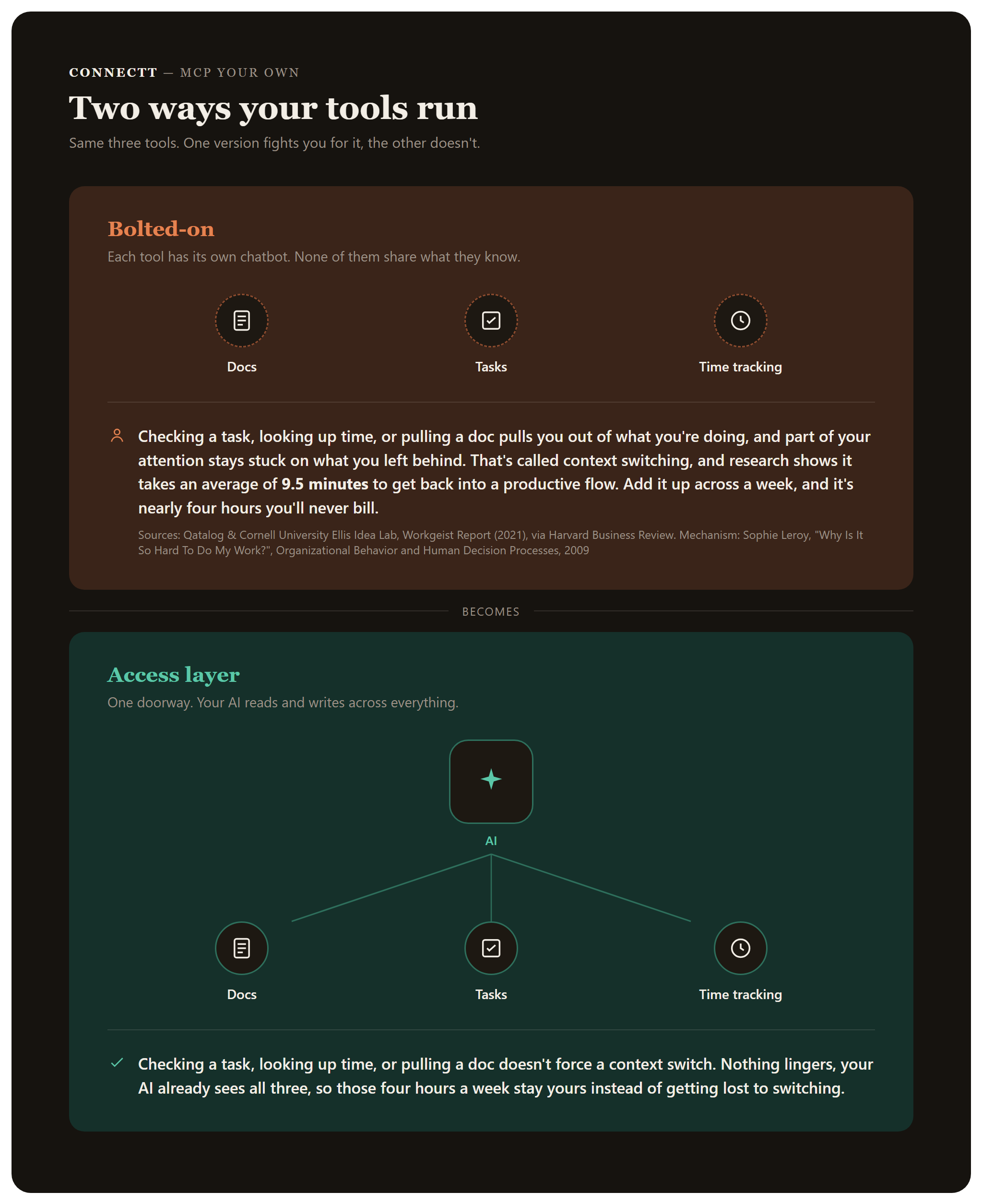
MCP is the protocol that lets an AI assistant securely connect to a real system and act inside it, not just talk about it. Think of it as a doorway. The AI shows up, signs in with real permissions, and from there it can read live data and make real changes: open a task, write a doc, check who's logged hours this week.
Anyone can install an MCP server someone else built. The version that matters is the one you control yourself, because then the permissions, the security, and what the AI is allowed to touch are decisions you make. Not decisions a vendor made for you.
One server, two surfaces. Build it once and it works everywhere your AI runs.
Chat in the browser and a coding assistant in the terminal both point at the same URL. Same doorway, same permissions, no second build.
The Access Layer, in Four Pieces
1. The doorway itself, with nothing to install. Our MCP server is hosted remotely. No local setup, no software to install on a teammate's machine. They add the connector once and they're in. The same doorway reaches your AI assistant on any device, in the browser or the terminal.
2. Live data the AI can act on, not just read. 14 tools live across three internal apps right now. In Knowledge, our internal doc and wiki system, the AI can search, list, fetch, create, update, and append docs. In Tasks, it can list what's in progress, open a specific task and read its comments, create new ones, update status, and leave comments. In Aion, our time tracking app, it can tell you who's tracking time right now, how many hours the team logged last week, and whether anyone is over or under capacity this month. One connection, all of it.
3. Permissions scoped per person. Each teammate connects as themselves, using their own key tied to their own account. The AI can never do more than the person could. A read-only key stays read-only. A tasks-only key can't touch docs. A connect key is an identity, not a password. It can only ever narrow what your account already allows.
4. Security that doesn't need to be rebuilt for the AI. The tools call the same API the rest of the platform does, so they inherit permissions, revision history, and notifications for free. Every write asks for a one-click confirm before it happens. Every edit is one rollback away from its previous version. There is no outbound tool. Even a hijacked session can't send your docs anywhere but back into Knowledge. Admin and Systems-AI are deliberately excluded, a different risk class, not exposed at all.
What Are You Missing Without AI Fully Connected to Your Systems?
Before the proof, take two minutes to see where you actually stand.
The Proof, Not a Pitch
The clearest example we have of this working isn't hypothetical. Our source document on this exact topic, the one this article draws from, was written by the AI directly into our Knowledge base through this MCP connection. No copy-paste, no exporting a chat transcript into a doc by hand. It found the right place, wrote the doc, and saved it with full edit history, the same as if a person had typed it.
That's a small thing to watch happen and a hard thing to fake.
It only works because the doorway actually reaches the system, instead of sitting next to it.
Where It Goes From Here
Knowledge, Tasks, and Aion are live. Pipeline is next: list deals, update stages, log activity. After that: Boardwatch, team schedule, client and project context. Each one plugs into the same doorway, inherits the same permissions model, and requires no new integration to buy.
Keys can only narrow what an account already allows. Never widen it. As more tools come online, the damage from any single compromised key stays small by design.
The Bridge
Most companies are buying AI feature by feature right now: one chatbot per tool, each one blind to everything outside its own walls. That's fine for answering questions inside a single system. It's the wrong move if you want AI that can actually operate alongside the people running the business.
The better move is building the connection layer once, on top of a system you already own, so every tool that plugs into it inherits the same access. That's what we did. It's also the kind of build that only makes sense once, because after it's built, everything new gets it for free.
Not another chatbot bolted onto a tool. The doorway that lets AI actually work inside the business that's running.
Frequently Asked Questions
What is MCP? MCP stands for Model Context Protocol. It's the standard that lets an AI assistant securely connect to a real system and act inside it, reading live data and making real changes, instead of only talking about data it was handed in a chat window.
How is an MCP server different from an AI chatbot inside a tool? A bolted-on chatbot can only see the tool it lives in. An MCP server is a doorway into a system, so one AI session can reach across every app connected to it: docs, tasks, time tracking, and whatever gets added next.
Why build your own MCP server instead of installing one? Anyone can install a server someone else built. Building your own means the permissions, the security model, and what the AI is allowed to touch are decisions you make, not decisions a vendor made for you.
Is it safe to give an AI write access to internal systems? It is when access is scoped per person. Each teammate connects with their own key tied to their own account, so the AI can never do more than that person could. Every write asks for a one-click confirm, every edit is one rollback from its previous version, and there is no outbound tool that could send data anywhere else.
What can Connectt's MCP server actually do today? 14 tools across three internal apps. Knowledge: search, list, fetch, create, update, and append docs. Tasks: list what's in progress, open a task and read its comments, create tasks, update status, leave comments. Aion, our time tracking app: who's tracking time right now, hours logged last week, and who's over or under capacity this month.
Do teammates need to install anything? No. The server is hosted remotely, so a teammate adds the connector once and they're in. The same doorway works with your AI assistant on any device, in the browser or the terminal.